
🆕 New feature: You can now control the English complexity of AI avatar dialogue and AI-generated feedback when building a roleplay customisation on BSGo.
What are Language Levels?
Language Levels let facilitators control how simple or advanced the English used by the AI avatar and AI-generated feedback is, when building a roleplay customisation on BSGo. Use this to match the roleplay's difficulty to your learners' English proficiency.
Which roleplays support Language Levels
Language Levels are currently available when customising the following roleplay types:
- Active Listening in the Workplace
- Building Rapport
- Debating
- Job Interview Roleplay
- Open Conversation
- Professional Conversations
- Public Speaking Roleplay
- AI Coach
⚠️ If you're customising a roleplay type not listed above, the Language Level setting will not be visible.
Available language levels
- Beginner — simple vocabulary and sentence structure (CEFR A2)
- Intermediate — a variety of sentence structures, no abstract language (CEFR B2)
- Native — advanced vocabulary and idiomatic language (Native/C2)
How to set a language level
- Open the customisation form for one of the supported roleplay types (see list above).
- Locate the Language Level setting in the roleplay customisation form.
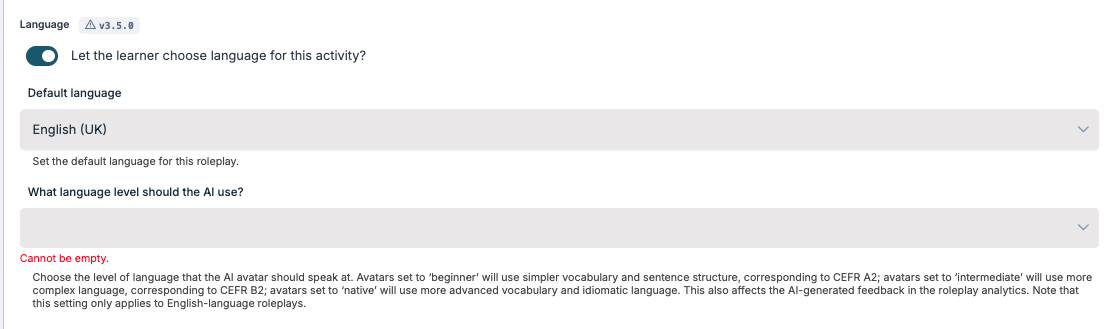
- Select Beginner, Intermediate, or Native.
- Save your customisation. The selected level applies to both the AI avatar's dialogue and any AI-generated feedback in the roleplay.
⚠️ Note: Language Levels only apply to English. If your roleplay is in another language, this setting has no effect.