
How avatar attire works
Depending on how your facilitator has set up the roleplay, you'll either choose your avatar's attire yourself or be prompted to pick from a themed set automatically.
If your avatar attire is set to "All"
You can choose your avatar's attire any time from your profile.
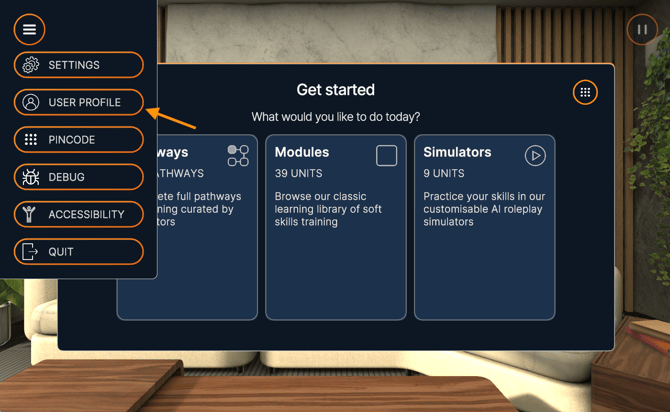
- Open the main menu.
- Select User Profile.
- Select Change Attire.
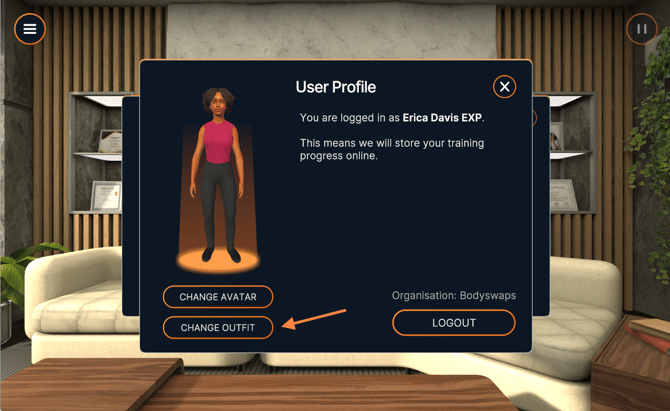
- Choose your outfit from the available options.
-1.png?width=670&height=398&name=unnamed%20(4)-1.png)
If your roleplay uses a specific theme
If your facilitator has set the roleplay to a specific theme (such as medical, dental, or formal), you'll be prompted to select an outfit from that theme automatically at the start of the roleplay.
- Start the AI Roleplay.
- When prompted, select an outfit from the themed options shown.
- Continue into the roleplay.
Note: You won't be able to pick outfits outside the assigned theme in this case — this is controlled by your facilitator's setup.