
What’s happening?
In some cases, when a learner enters a class code for a class that has a roleplay and a pathway assigned, the expected training content may not appear and instead, a title screen will appear.
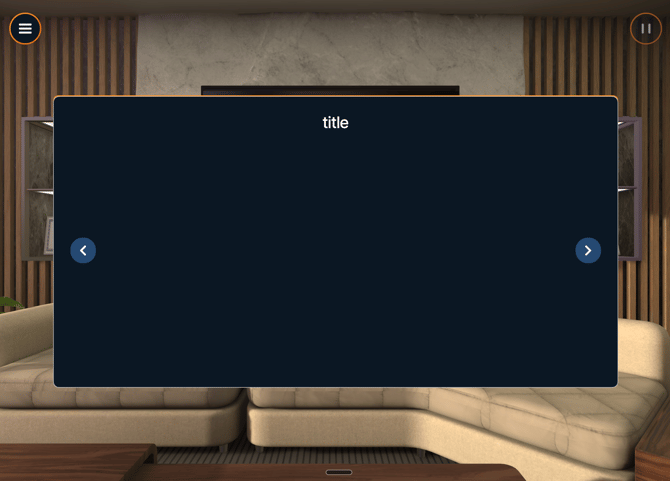
This is a known issue, and our team is actively working on a fix.
Who is affected?
-
Learners joining a class using a class code with specific class content
-
Administrators managing classes with specific combinations of assigned content
When does this issue occur?
Content combinations that may cause issues
| Class Assignment Setup | Status |
|---|---|
| Pathway + Roleplay (no Module) | ❌ Content may not appear |
| Two roleplays of the same type assigned directly to a class | ❌ Content may not appear |
| A roleplay assigned to the class and a roleplay of the same type included in a pathway | ❌ Content may not appear |
| Two roleplays of the same type within a single pathway |
❌ Content may not appear |
Important: This issue is most likely to occur when the same roleplay type appears more than once within a class — whether assigned directly, included in a pathway, or repeated within a pathway itself.
Temporary workarounds
Until this issue is resolved, you can use one of the following workarounds.
Option 1: Re-enter the class code (Learner workaround)
-
Enter the class code as usual.
-
If no content appears, select the Menu, then Pincode.
*If in VR, select the menu button the lefthand controller -
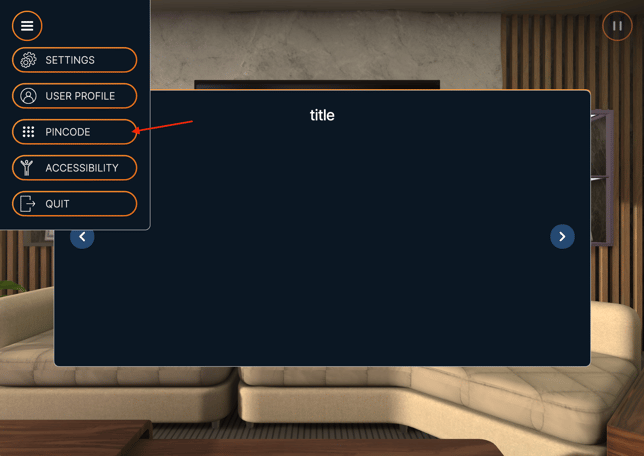
Re-enter the same class code a second time.
-
If the content still does not appear, re-enter the same class code a third time.
-
The assigned training content should now load correctly.
Is a fix coming?
Yes. We’re working swiftly to resolve this issue and will update this article once a permanent fix is available.
Need help?
If the issue persists after trying the workarounds, please contact Support and include:
-
The class code
-
The content assigned to the class (module, pathway, roleplay)