![Secondary White-Mar-14-2025-08-04-22-1173-PM.svg]](https://support.bodyswaps.co/hubfs/Secondary%20White-Mar-14-2025-08-04-22-1173-PM.svg)
Issue:
When using Microsoft Edge, clicking certain tabs in Bodyswaps GO (such as AI Roleplay, Users, etc.) redirects you back to the sign-in screen.
Cause:
This issue is likely caused by browser cookie settings. Bodyswaps GO uses cookies to keep you signed in. If these cookies are blocked, the platform can't authenticate your session, which causes it to log you out.
How to Fix It (Microsoft Edge):
-
Look at the top-right corner of your Edge browser window.
-
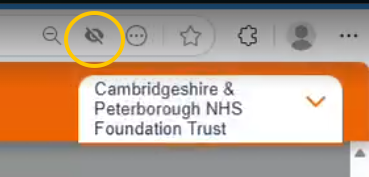
Check for a small eye icon that appears to be crossed out (see below).
-
If you see this icon, click it to allow cookies for the Bodyswaps GO site.
-
Refresh the page and try accessing the tabs again.
This change should restore access and prevent you from being redirected to the sign-in screen.
Still having issues?
If the problem continues after enabling cookies:
-
Email us at support@bodyswaps.co Let us know which browser you're using.
-
We’re happy to provide tailored guidance or schedule a call to help troubleshoot further.