🆕 New Feature: The Training Library is a new tab in Bodyswaps Go, giving facilitators one place to find, build, and assign content.
Be sure to check out our article here to ensure you are using the new Bodyswaps Go version.
On this page
- What is the Training Library?
- Exploring the Library
- Creating Roleplays and Pathways
- Editing Existing Content
- Assigning Content to Your Class
What is the Training Library?
The Training Library is a tab in Bodyswaps Go available to administrators and Coaches. From here you can:
- Explore content created by other facilitators and by Bodyswaps
- Create and edit your own roleplays and pathways
- Assign any unit directly to your classes
Exploring the Library
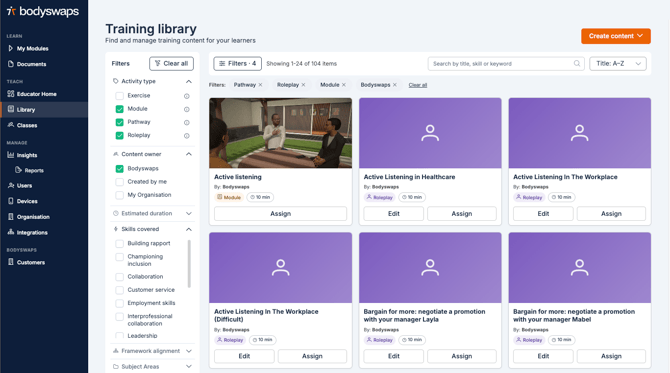
- Use the search bar at the top of the page to find content by keyword.
- Use the filters in the side panel to narrow your results by:
- Activity type — module, exercise, roleplay, or pathway
- Created by —
- Bodyswaps: Activity curated by Bodyswaps Learning Designers
- 'Created by me': Activities created by you (applies to roleplays or pathways)
- My Organisation: Activities created by others at your institution
- Skill
Tip: Apply the "Created by Me" filter to quickly find anything you've built — from there you can open it for editing.
Creating Roleplays and Pathways
- Select Create New.
- Choose Roleplay or Pathway, depending on what you want to build.
For full step-by-step guidance on building each type, see:
Editing Existing Content
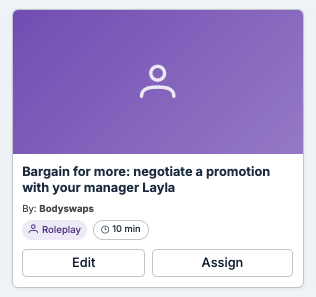
- To edit a roleplay or pathway you've created, select the Edit tab on that unit.
- Modules and exercises are pre-built units and cannot be edited — you won't see an Edit option on these.
Assigning Content to Your Class
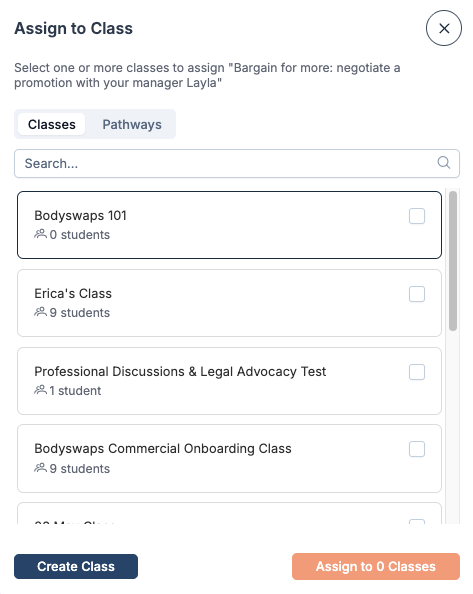
- Select Assign on the unit you want to share.
- Locate the class you wish to assign it to.
- To assign to more than one class at once, tick the checkbox next to each additional class name.